Posts
VirtualBox Headless Configuration on Ubuntu | Virtualbox for server lucid
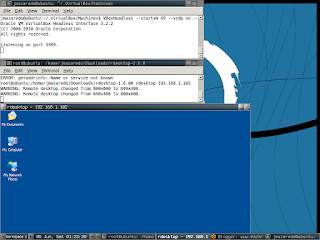
Step 1. Install your Linux os (used ubuntu) a. use a lightweight desktop manager if you have only 1 pc (fluxbox) Step 2. Download VirtualBox package at VirtualBox.org a. use your appropriate distribution (on me is dpkg) Step 3. Install VirtualBox ( install your guest os i named my guest xp) Step 4. Install rdesktop (I have compiled the source since I think its not available on ubuntu repository. make sure you have compiler. Extract the package and $ ./configure $ make (It will show errors if you don't have compilers installed like gcc etc. just download it using apt-get on ubuntu, yum on fedora etc) Step 5. Run VirtaulBox at console VBoxHeadless --startvm XP --vrdp on --vrdpaddress 192.168.1.102 --width 512 Step 6. Run rdesktop 192.168.1.102 Full working Headless VirtualBox * SO HOW CA YOU LEAVE THE SERVER (GUEST OS RUNNING IN BACKGROUND? USE SCREEN! SCREEN(1) ...
Red Hat Drops Xen!
With Wednesday's beta release of its flagship operating system, Red Hat Enterprise Linux (RHEL), Red Hat has added a number of new capabilities that should help data centers better support virtualization and cloud computing. RHEL 6.0 will also have at least one less feature as well. This will be the first version of the OS not to include the Xen hypervisor. Instead the company plans to focus its virtualization efforts around the kernel-based Virtual Machine (KVM), said Tim Burke, Red Hat vice president of platform engineering Nore of this here
Nginx Load Balancing | Reverse Proxy Nginx | SSL Nginx
Used The howto of nixcraft.in.conf that can be found on google baby First File GNU nano 2.0.9 File: nginx.conf.bak #pid /var/run/nginx.pid; pid ...
Haproxy | HAProxy | Web load Balancing
#--------------------------------------------------------------------- # Example configuration for a possible web application. See the # full configuration options online. # # http://haproxy.1wt.eu/download/1.3/doc/configuration.txt # #--------------------------------------------------------------------- #--------------------------------------------------------------------- # Global settings #--------------------------------------------------------------------- global log 127.0.0.1 local2 chroot /var/lib/haproxy pidfile /var/run/haproxy.pid maxconn 4000 user haproxy group haproxy daemon #-------------------------------...
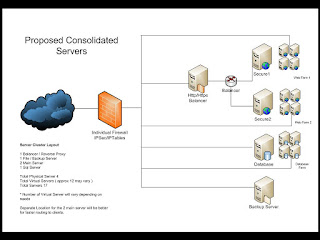
nginx as load balancing rather than squid
I have tried and tested nginx load balancing but haven't used its secure port. if anyone has a working configuration to load balance 2 secure server please kindly post it here. Will post my configuration here later thanks!