Posts

CentOS, Postfix, Dovecot, Spamassassin, Postfixadmin, and Squirrelmail

 This is not my howto this is by karlkatzke all credits to him CentOS, Postfix, Dovecot, Spamassassin, Postfixadmin, and Squirrelmail by karlkatzke on May 27th, 2008 What a mouthful. Like most other americans who live on a budget, I’m taking a “staycation” this weekend. What better thing to do than to get my mail server migrated to my new VPS? Well, first, I suppose, I should get the mail server all working on the new VPS… In CentOS, the default Postfix package doesn’t have MySQL support built in. If you’ve got the priorities plugin installed, you’re either going to need to disable it or otherwise work around it so that you get the one from the centosplus repo. Other than that, it’s been made about as easy as it can be… just keep in mind as you’re reading this tutorial that I really loathe administering mail servers and consider it to be a quite onerous chore that’s been made even more onerous by spammers and hackers and script kiddies and what have you. You’ll need to ...

Frozen in time

Image

The Great Escape

VirtualBox Headless Configuration on Ubuntu | Virtualbox for server lucid

Image
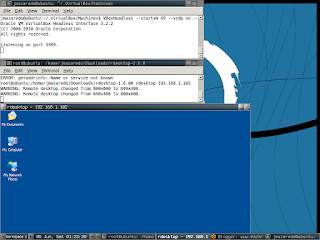
Step 1. Install your Linux os (used ubuntu) a. use a lightweight desktop manager if you have only 1 pc (fluxbox) Step 2. Download VirtualBox package at VirtualBox.org a. use your appropriate distribution (on me is dpkg) Step 3. Install VirtualBox ( install your guest os i named my guest xp) Step 4. Install rdesktop   (I have compiled the source since I think its not available on ubuntu repository. make sure you have compiler. Extract the package and $   ./configure $    make (It will show errors if you don't have compilers installed like gcc etc. just download it using apt-get on ubuntu, yum on fedora etc) Step 5. Run VirtaulBox at console VBoxHeadless --startvm XP --vrdp on --vrdpaddress 192.168.1.102 --width 512 Step 6. Run rdesktop 192.168.1.102 Full working Headless VirtualBox * SO HOW CA YOU LEAVE THE SERVER (GUEST OS RUNNING IN BACKGROUND? USE SCREEN! SCREEN(1)            ...

Red Hat Drops Xen!

With Wednesday's beta release of its flagship operating system, Red Hat Enterprise Linux (RHEL), Red Hat has added a number of new capabilities that should help data centers better support virtualization and cloud computing. RHEL 6.0 will also have at least one less feature as well. This will be the first version of the OS not to include the Xen hypervisor. Instead the company plans to focus its virtualization efforts around the kernel-based Virtual Machine (KVM), said Tim Burke, Red Hat vice president of platform engineering   Nore of this here

Nginx Load Balancing | Reverse Proxy Nginx | SSL Nginx

Used The howto of nixcraft.in.conf that can be found on google baby First File   GNU nano 2.0.9                                          File: nginx.conf.bak                                                                                          #pid        /var/run/nginx.pid; pid   ...